Converting Windows OEM speaker tuning to Linux
Your laptop speakers sound horrible on Linux but decent on Windows? I’ve used Debian as my primary OS for the past 23 years, and this has always bugged me. I unfortunately do not have any audio engineering skills, so I never could fix this myself. Earlier this year I decided to give it a try with Claude Code. The speaker-tuning-to-easyeffects project now has more than 50 confirmed laptop models on which users reported improved audio.
Some Windows laptops, typically on the higher end, come with “Dolby Atmos” badging. Manufacturers such as Lenovo, ASUS, Framework or Microsoft tune an audio processing pipeline to compensate for physical limitations of the speakers’ drivers. The effects are huge. If you have such a device running Windows, try disabling processing in audio settings to hear the difference. Interestingly, a big part of the tuning is described in legible XML files which ship with the device’s Windows audio drivers.
The challenge here was to create something which would deterministically convert those parameters to a reasonable approximation Linux users could set up on their specific model with a single simple command. That meant being able to infer processing filters solely from available XML configuration files. No per-device heuristics or by-ear tuning, as that would prevent the tool from being broadly applicable to a wide set of laptops. Also no reverse engineering of any of the Windows-side binaries.
Running on Linux
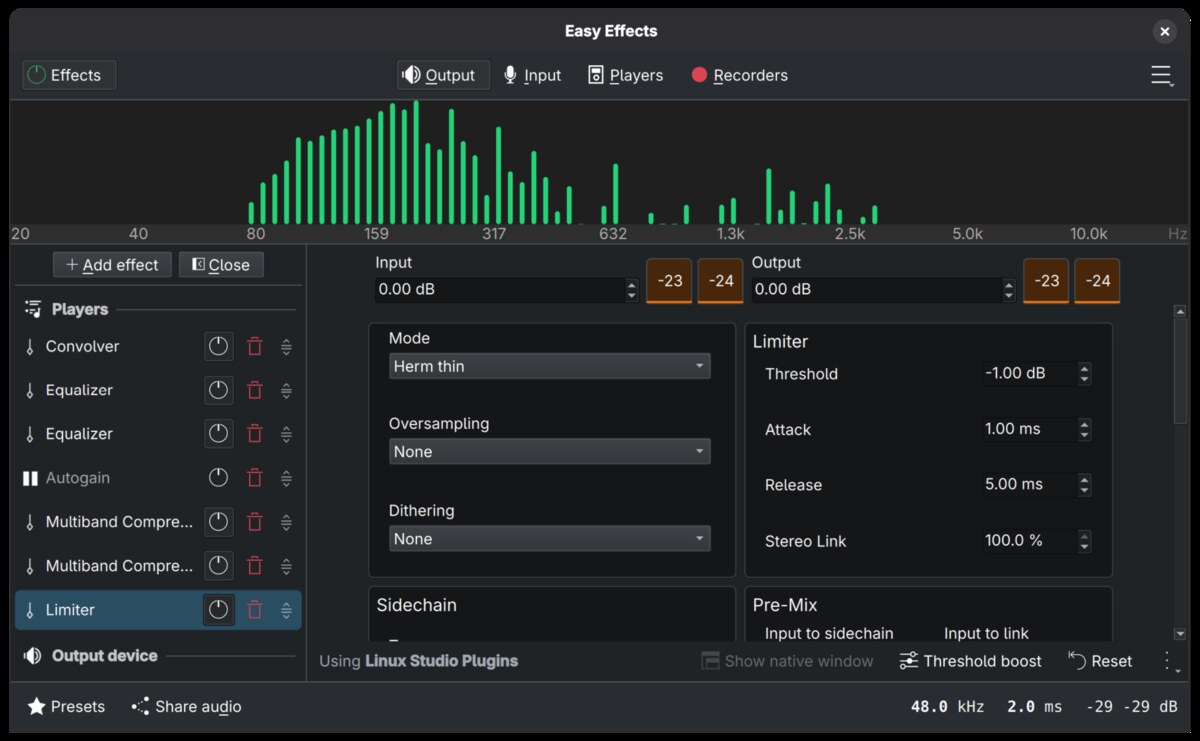
Linux has a pretty comprehensive audio stack which is quite daunting to get into. PipeWire makes for a rich foundational multimedia graph processing engine, which combined with WirePlumber provides a very expressive end-to-end pipeline. Unfortunately it’s also complex to configure, which is why I decided to go with Easy Effects as the primary target. Wellington Wallace’s Easy Effects is a delightfully simple GUI for configuring and managing input and output effect chains. Its approachable user interface makes it easy to see effects in action, A/B test different configurations, and, if desired, further tweak filters to one’s preference.1
Building the harness
Now that we know what we’re starting from, and where we want to land, how do we actually get there?
The converter’s initial version was built on Opus 4.6’s interpretation of the XML file’s contents and my ears acting as a judge - i.e. does it sound better, and are there audible artifacts? Very unscientific.
This rapidly shifted to something more objective and principled, in part thanks to one early adopter’s very pointed questioning of the tool’s generated presets (thanks taprobane99!):
- Use audio captured via loopback on Windows as the ground truth for the target effect chain. To capture various effects of the pipeline, a catalog of stimuli is generated, which help characterize different aspects of the pipeline - e.g. its frequency response, limiters, regulators, or dynamic effects. This was built so that users could contribute back captures from their own devices.
- Compare audio captured on Linux against it to quantify effects being investigated. This is codified in an audio-validate skill which is trivially easy for Claude Code to use when iterating through various hypotheses to test.
- Codify invariants which scope admissible solutions:
- Parameters & effects must only be derived from the OEM tuning file(s). This prevents ungrounded heuristics overfitting to a specific device at the expense of others.
- The overall chain must not introduce additional latency. This ensures audio stays in sync with content after being processed through the chain.
- Every claim the project records traces back to evidence.
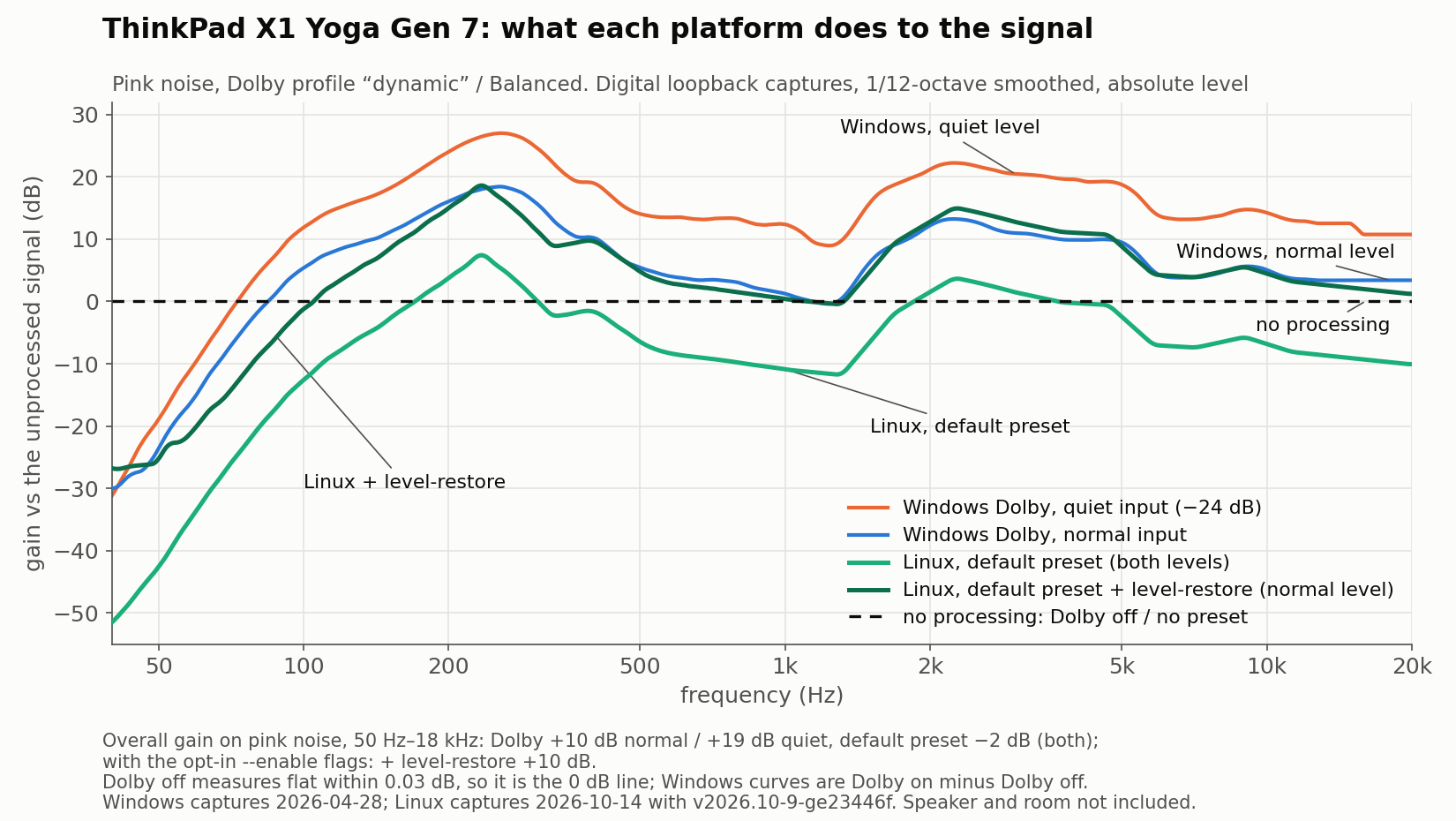
An example of the measurement harness in action: on a ThinkPad X1 Yoga Gen 7, Windows adds about 10 dB of gain at normal level and 19 dB at quiet level. By default the converted preset is about 12 dB lower than Windows, as it is normalized to keep headroom. The opt-in --enable level-restore tracks the Windows normal level curve closely, but unfortunately causes audible artifacts on loud speech on this laptop, so it stays off by default. Neither follows Windows’ extra gain at quiet levels. Not shown here: --enable autogain on top lifts quiet input to +16 dB against Windows’ +19 dB, but overshoots by 3 dB at normal level, and on this device audibly saturates loud speech after quiet spans.
As users started reporting success or mixed results on their devices, the corpus against which changes are audited grew. While I only have two full Windows-side reference captures at the moment, thousands of tuning files from driver packages can be analyzed locally to identify what’s invariant and what varies from device to device across typical configurations. These further helped formulate hypotheses, which captured audio or end-user listening could then validate.
As new hypotheses get formulated and tested, and users report feedback, Claude is instructed to keep technical reference documentation and a research log up to date to ensure data accrues, thus improving long term outcomes and preventing relitigation of previous findings.
Why the harness matters
Let’s look at real world examples showcasing the harness’ value.
Initial transcription of the XML tuning files had assumed the ieq-amount=10 parameter to be scaled by /10, applying the IEQ target response curve at full weight. Reviewing the converter, taprobane99 argued the IEQ curve dominated the filter and tried weighting it at 10%, while noting “this could still be wrong”. On my device his 10% cut the error against Windows from ~12 dB to ~1 dB RMS, which a finer sweep then confirmed to be the minimum error. Every internal speaker profile in the corpus uses value 10 (only a few headphone profiles use 8), preventing the tuning files alone from revealing the unit. Read as a percentage, that field gives exactly the 10% that measured best, so the fix stays derived from each tuning file instead of hardcoding a measured weight. This immediately led to a systematic inventory of unsourced constants in the converter and corresponding experiments to validate them.
One entry in that inventory was stereo widening that 82d7f3d had derived from the surround-boost parameter with an invented divisor and cap. This sat unmeasured for 3.5 months as initial captures had used correlated noise, which a widener leaves unchanged. A Windows capture with a decorrelated stereo stimulus measured actual widening at essentially zero (+0.01 dB stereo width where our converter added +4.10 dB). This led to the mapping being removed.
Grounding the model in measurements acts as a guardrail against hallucinations or untested guesses. As with peer-reviewed research, review raises doubt and the experiment settles it: taprobane99 questioned the scaling and the inventory questioned the widening; measurement closed both. The project now codifies this as a rule that every claim the project records traces back to evidence (a measurement, a tuning file field or a corpus count) so inaccuracies don’t build up over time.
The converter
The converter is built as a simple Python script which autodiscovers your laptop’s tuning file from a mounted Windows partition or a downloaded driver package. It automatically sets up converted presets for use in Easy Effects or PipeWire.
python3 dolby_to_easyeffects.py --autoloadRead Quick Start for more details.
In a follow-up post I’ll cover how the project provides simple user-facing diagnostics to ensure successful setup in any user’s Linux environment.
Limitations
The resulting filter chain closes quite a bit of the perceived quality gap with Windows, but problems remain to be solved:
- Windows-side tuning seems to involve psychoacoustics for things like virtual bass2 which I haven’t found a way to emulate in Easy Effects.
- It also uses adaptive steering through a media intelligence layer for which I couldn’t find an open-source equivalent on Linux.
- Combined software and hardware signal processing seems to be used at least on some devices. At the moment, the resulting chain on Linux is software only.
- On some devices, a few transcribed filter stages or parameters might generate audible artifacts. As a result, some filters are disabled by default to keep things “safe”, but this does require users to manually opt in through trial and error if they are not fully satisfied with the default presets. Artifacts typically depend on content loudness or rapid shifts in levels, the current hypothesis being that media intelligence is the layer in Windows which helps prevent them.
If you have ideas on how to bridge those gaps, please do share on GitHub. This is likely where actual audio engineering expertise would be useful to the project.
Learn more and try it out yourself at https://github.com/antoinecellerier/speaker-tuning-to-easyeffects. Please leave a star if you like what you hear, and contribute device reports back if your device isn’t already listed.