Building a Cross Platform Digital Multimeter App
How I implemented digital multimeter protocols using Claude Code assisted research and development … without access to hardware.
Backstory
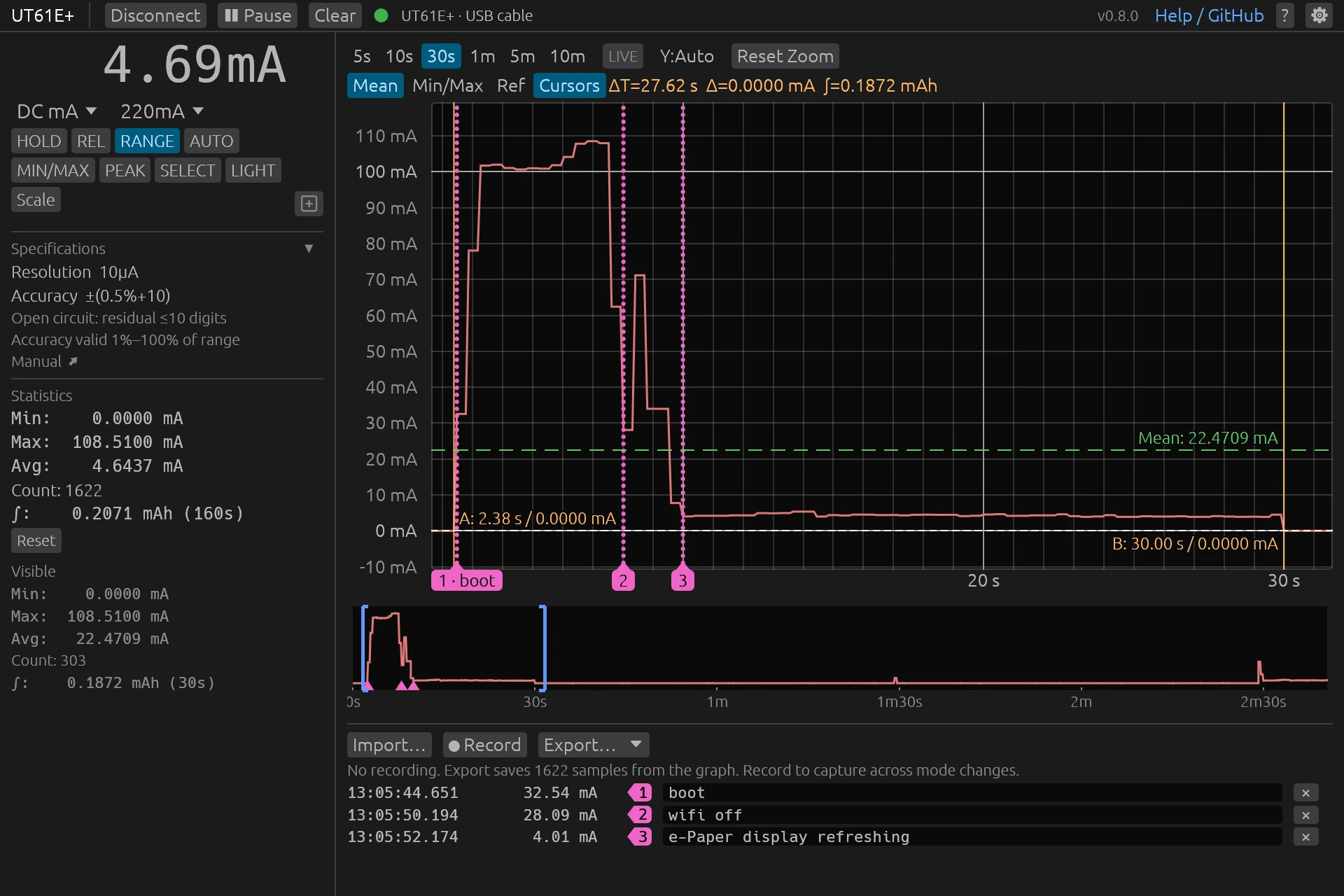
While prototyping a battery powered e-paper thermometer back in 2021, I was looking for a means to evaluate power consumption through various power states. Initial research led me to purchase UNI-T’s UT61E+ digital multimeter as it came with a USB logging interface. UNI-T provided a Windows application which worked but required me to switch OS to use … a bit inconvenient.
Fast forward to early 2026, I’m watching the excellent nanofix videos to try to improve my soldering skills, in which he talks about the open source app rusty_meter for some lab-grade OWON multimeters. This inspired me to try building something similar for the UT61E+ I could actually use on my Linux laptop.
This proved to be a perfect excuse to experiment with coding agent driven protocol reverse engineering & verification - in this case using Claude Code. Things quickly evolved from “can I connect to my UT61E+ device” to “is it possible to clean-room reverse engineer protocols for meters I don’t have and actually have them work?”
It worked way better than anticipated. The dmm-tools project is now confirmed working on 5 different meters from 2 brands across 4 protocols and 4 transport links.
Principles
Even more so today with LLM driven development, designing controls to validate hypotheses as early as possible helps tremendously in optimizing results - getting things right, and getting them right fast. On this project, controls basically split between two categories:
- those based on data which is readily available to me, e.g. something downloadable from the internet,
- those requiring physical hardware which I do not have, e.g. a specific meter or adapter.
For the first category, I can make heavy use of Claude Code to drive workflows. These cover things like researching content online, reverse engineering protocols from manufacturer software, and correlating with community sources. Iterations on these have become relatively cheap. 1
The second category needs to assume some other person is driving hardware, with no coding agent of any sort involved. Each round trip requires coordination over a GitHub issue, with a high likelihood of people giving up. Iterations here are expensive and require cooperation from other people.
Researching protocols
This is the initial inner loop.
Adding support for a device is codified in a skill and developer facing docs with important steps being:
- Research online resources: does the manufacturer publish manuals, applications, or even reference protocol docs? Here we’re trying to assess availability of sufficient information required for later success.
- Clean-room reverse engineering: using only manufacturer provided resources, document the protocol as thoroughly as possible. Clearly attribute different aspects of the protocol to sources and state areas of uncertainty or assumptions being made.
- Only once clean-room reverse engineering is complete, open up correlation with community sources. Popular meters will typically have a few GitHub projects implementing some level of support. These sources are used to confirm reverse engineered results and provide additional sources where facts remain unknown.
At each step, findings are reviewed by separate agents with each fact being traced back to its source in order to limit the likelihood of hallucinated content making it into protocol docs.
Once this is done, each meter family sharing a protocol will get a research entry describing both the protocol and the approach which was taken when reverse engineering.
These days, researching and implementing support for one device family’s protocol typically takes about one session using Opus 5.5, with minimal user input needed outside of the initial instruction to “add support for {meter xyz}”.
Validating protocols
This is an outer loop where each iteration might take days or not even happen at all.
While there are controls in place during the research loop to minimize hallucination or slop, you can never be sure things work before testing on real hardware. The primary objective is to make it super simple for a user finding the project and trying things out on their meter to report valuable data back so we can confirm the current implementation and - very likely - correct errors.

When a meter’s protocol is not fully verified, CLI and GUI users get a link to a prepopulated GitHub issue outlining what is not verified and how to run through a guided capture workflow designed to acquire actual protocol frames and connection data. These steps are designed to:
- Provide reference data usable for testing,
- Trace bytes on the wire (or air) to help debug unsuccessful connection negotiation or frame decoding,
- Progressively automate the capture process as more facts about the meter become verified - this increases our likelihood of a user actually running through the full capture workflow:
- A few steps are designed as gates with manual user confirmation that data was read back correctly e.g. is a voltage or resistance reading correct,
- As confidence builds up that the basic protocol is working, where feasible the capture stops requiring explicit user confirmation and auto-advances when it encounters what it expects,
- If the meter allows some controls to be operated remotely - e.g. a mode or range selector - those are driven automatically to reduce the number of actions required of the user on the meter.
For illustration purposes, here are snippets showing what a user sees while running through select workflow steps.
% ./dmm-cli capture
Detected UT61E+ (pass --device ut61eplus or pick it in dmm-gui to skip detection next time)
Checking meter communication...
Device: UT61E+
Status: supported model

You will need:
  [1] shorted test leads  (steps: dcv_short, ohm_short, continuity)
  [2] battery or other DC source  (steps: dcv_negative)
  [3] live mains wire nearby  (steps: ncv)
  [4] transistor  (steps: hfe)
You can see a resistance gate showing readings and asking for explicit user confirmation.
[ohm_body] Ω mode: hold one probe tip between the fingers of each hand (body resistance, hundreds of kΩ). (gate)
  meter shows: value is OL, want a numeric reading
    [0] mode=0x06(Ω) range=22MΩ display="6.863"
    [1] mode=0x06(Ω) range=22MΩ display="6.863"
    [2] mode=0x06(Ω) range=22MΩ display="6.863"
  We read: 6.863 MΩ [AUTO]
  Did the meter show this? (Enter = yes, n = no, r = retake)
The next example automatically walks through AC voltage ranges, various hold, relative value, max and min commands, only requiring the user to turn the meter’s dial once and then wait:
[acv] Set meter to AC V (V~). Leave leads open.
  meter shows: mode is "AC mV", want "AC V"
    [0] mode=0x00(AC V) range=2.2V display="0.1128"
    [1] mode=0x00(AC V) range=2.2V display="0.1128"
    [2] mode=0x00(AC V) range=2.2V display="0.1197"
  We read: 0.1197 V [AUTO]
    ↳ range:2.2V  0.1192 V
    ↳ range:22V  0.599 V
    ↳ range:220V  0.64 V
    ↳ range:1000V  0.0 V
    ↳ hold:on  0.0988 V [HOLD AUTO]
    ↳ rel:on  0.0000 V [REL]
    ↳ minmax:max  0.1172 V [MAX]
    ↳ minmax:min  0.1171 V [MIN]
    ↳ peak:p-max  0.1786 V [P-MAX]
    ↳ peak:p-min  -1.5212 V [P-MIN]
It actually works
In some cases as with the ZOTEK ZT-5B, things mostly worked first try. Even though the user reported “nothing is incorrect”, the capture still showed a few gaps in the protocol implementation which wouldn’t have been noticed if just relying on unguided user reporting. This also happened to be the device with the shortest implementation to verification delay at only 7 days!
In other cases such as the UNI-T UT804, things didn’t work at all which helped inform some requirements for initial connection capture. The implementation predated current structured skills and had run on older Opus models. The newly redesigned guided capture steps allowed progressively confirming fixes across 4 iterations with the user to cover the 30 or so verification steps.
Closing thoughts
At a meta level, what I find interesting here is that we’re completely changing the sequencing of what the workflow would have looked like prior to coding agents. You would typically only have iterated against the hardware step by step, progressively confirming if the transport layer works, if protocol frames are showing on the wire, if they’re properly parsed, if commands emitted to the meter actually take effect. Here we end up assuming that it’s likely we mostly get it right first try, and invest in building progressive data capture and validation someone else can run to reliably confirm on a distant meter and provide trustworthy data back.
LLM coding agents have become so powerful at executing high-skill but somewhat tedious tasks that it completely changes the calculus of what’s possible and where residual complexity lies.
Learn more and try it out yourself at https://github.com/antoinecellerier/dmm-tools.
If you happen to own a USB HID or Bluetooth multimeter from UNI-T, ZOTEK, ANENG, Brymen, EEVBlog, OWON or Voltcraft, please do share your experience through GitHub issues.
The fact that this is even possible never ceases to amaze me … reverse engineering previously required very specialized skills I do not have. Even early 2026 Opus versions which required coaxing to use tools like Ghidra were quite good at it once they got going. ↩︎